—————-
接下来的事情要安装的是PHP解释器和PHP-FPM。 PHP-FPM是PHP专用的来管理处理PHP请求的FastCGI进程管理器,它兼容的大部分WEB服务器。
Nginx <== 通信 ==> Php-FPM <== 管理 ==> php child process
首先安装必要的包。
apt-get install php5 php5-fpm
它会自动安装相关依赖包,如果你需要用命令行运行脚本,你可以安装 ‘php5-cli’ 包
Php-fpm 以单独的服务器运行,并且使用套接字(socket)与nginx通信。因此,php的执行是完全与nginx隔离的,此外由于fpm保持php进程持续,所以它完全支持APC。
现在,我们看一下php-fpm配置文件,文件在
/etc/php5/fpm/
进程池(Pool)是一组具有相同的用户/组运行PHP进程。所以如果你想每个网站的脚本以独立的用户权限运行,你需要创建独立的fpm进程池。为了简单起见,我们在这只演示单个进程池。
The pool configuration files are inside the pool.d directory. Navigate in
进程池的配置文件在pool.d目录。如下
root@localhost:/etc/php5/fpm/pool.d# ls
www.conf
www.conf也是供你创建独立进程池的模板,它的内容差不多是这样子的
; Start a new pool named 'www'.
; the variable $pool can we used in any directive and will be replaced by the
; pool name ('www' here)
[www]

; Per pool prefix
; It only applies on the following directives:
; - 'slowlog'
; - 'listen' (unixsocket)
; - 'chroot'
; - 'chdir'
; - 'php_values'
; - 'php_admin_values'
; When not set, the global prefix (or /usr) applies instead.
; Note: This directive can also be relative to the global prefix.
; Default Value: none
;prefix = /path/to/pools/$pool

; Unix user/group of processes
; Note: The user is mandatory. If the group is not set, the default user's group
;       will be used.
user = www-data
group = www-data

; The address on which to accept FastCGI requests.
; Valid syntaxes are:
;   'ip.add.re.ss:port'    - to listen on a TCP socket to a specific address on
;                            a specific port;
;   'port'                 - to listen on a TCP socket to all addresses on a
;                            specific port;
;   '/path/to/unix/socket' - to listen on a unix socket.
; Note: This value is mandatory.
listen = /var/run/php5-fpm.sock

; Set listen(2) backlog.
; Default Value: 128 (-1 on FreeBSD and OpenBSD)
;listen.backlog = 128
The above thing consists of comments mostly and the most important 4 lines are
- [www] 是进程名 2.user = www-data 是指定脚本的运行用户权限 3. group = www-data 是指定用户组 4. listen = /var/run/php5-fpm.sock 是改池的套接字通信地址。该套接字必须给nginx读写权限,让nginx与fpm通信。
我们在这里不准备修改太多。只用记住套接字通信地址,将它放到nginx的配置文件里。打开nginx的配置文件
里面包含一个类似下面的配置
# pass the PHP scripts to FastCGI server listening on 127.0.0.1:9000
#
#location ~ \.php$ {
# fastcgi_split_path_info ^(.+\.php)(/.+)$;
# # NOTE: You should have "cgi.fix_pathinfo = 0;" in php.ini
#
# # With php5-cgi alone:
# fastcgi_pass 127.0.0.1:9000;
# # With php5-fpm:
# fastcgi_pass unix:/var/run/php5-fpm.sock;
# fastcgi_index index.php;
# include fastcgi_params;
#}
去掉注释,修改成
location ~ \.php$ {
  fastcgi_split_path_info ^(.+\.php)(/.+)$;
# # NOTE: You should have "cgi.fix_pathinfo = 0;" in php.ini

# # With php5-cgi alone:
# fastcgi_pass 127.0.0.1:9000;
  # With php5-fpm:
  fastcgi_pass unix:/var/run/php5-fpm.sock;
  fastcgi_index index.php;
  include fastcgi_params;
}
测试PHP
现在在网站根目录下面放一个有phpinfo函数的文件
<?php

phpinfo();
然后在浏览器中打开这个文件,你将看到的是php的信息,意味着php配置成功且运行正常。
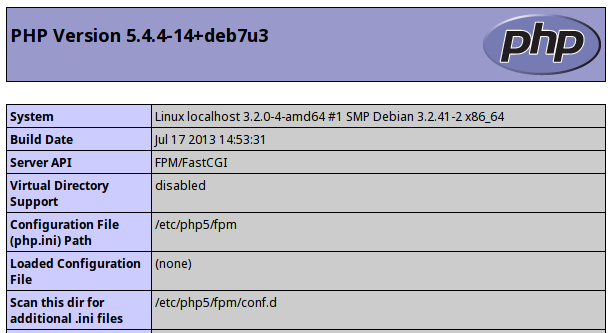
另外一点,你可以将index.php加入你索引列表,这样当访问目录时,将默认调用index.php。
root /usr/share/nginx/www/binarytides.com;
index index.html index.htm index.php;
安装apc - Alternative PHP Cache
APC是一个提高PHP脚本的执行速度的好方法。 APC编译PHP代码,并保存操作码在内存中,这样就不需要从文件中重新编译相同的php代码。这大大加快执行速度。除了操作码缓存,APC还提供了一个用户缓存来在内存中存储PHP应用程序原始数据。
PHP5.5版本中引入了一个名为OPcache的新功能,它实现与apc一样的操作码缓存,从而降低了apc的地位。
设置apc是非常简单和快捷的,只用为php安装apc包。
apt-get install php-apc
然后重启php-fpm
service php5-fpm restart
现在,刷新的phpinfo页面,它有关APC的信息了。apc的配置文件在
/etc/php5/fpm/conf.d/20-apc.ini
这个文件可以根据的性能优化作相应的调整。以下是我使用的配置
extension=apc.so

apc.enabled=1
apc.shm_size=128M
apc.ttl=3600
apc.user_ttl=7200
apc.gc_ttl=3600
apc.max_file_size=1M
查找apc参数的,以获取更多的信息。
原文:install-nginx-php-fpm-mariadb-debian